- Do AI Overviews Have Ranking Positions?
- Step 1: Manually Search in Incognito Mode
- Step 2: Identify the Type of AI Citation
- Step 3: Check Across Devices
- Step 4: Use SEO Tools That Track AI Citations
- Step 5: Analyze Google Search Console Signals
- Step 6: Track Query Intent and AI Triggers
- Step 7: Create a Weekly AI Overview Tracking Sheet
- AI Overview Ranking Tracking Checklist
- Common Mistakes When Tracking AI Rankings
- Why Tracking Matters Before Optimization
- Final Answer
- Frequently Asked Questions about Ranking in Google AI Overview
Tracking visibility inside Google’s AI Overviews is different from traditional rankings. You’re no longer just checking position #1–#10 — you’re checking whether your site is cited inside an AI-generated summary. If you want to properly measure performance before you optimize content for Google AI Overviews, you first need a clear tracking system. But here’s the critical point:
AI Overviews do not have traditional ranking positions like #1, #2, or #3.
So, how do you check your website ranking in Google AI Overviews? You track citation visibility — not numeric positions. In this blog, we’ll break down the process step by step and give you actionable methods to monitor your AI visibility effectively. Read the best guide from Google “AI features and your website.”
Do AI Overviews Have Ranking Positions?
No. Google AI Overviews do not assign visible ranking numbers. Your website can either:
- Appear as a cited source
- Appear as a secondary or expandable reference
- And sometimes, multimedia content can appear too — like images from websites, YouTube videos, or even content from platforms like Facebook.
- Or not appear at all
Unlike traditional search rankings, AI Overviews focus on authority and relevance rather than a linear order. That means tracking AI visibility requires a different system than traditional SEO tracking.
Before optimizing content for Google AI Overviews, you must first measure whether your content is being cited — otherwise, any optimization efforts are guesswork. Dominate with 10 steps to write zero-click content to rank on Google AI Overview. Here’s the practical way to do it in 2026.
Step 1: Manually Search in Incognito Mode
Manual verification is the simplest starting point:
- Open Chrome (or another browser) in Incognito mode.
- Search your target keyword.
- Check if an AI Overview appears.
- See if your website is cited.
- Note which competitors are mentioned.
Incognito mode prevents personalization and gives a more accurate view of how the general public sees search results.
Tip: If no AI Overview appears, that keyword currently does not trigger AI summaries — it’s better to focus on keywords more likely to generate AI visibility.
Step 2: Identify the Type of AI Citation
Not all citations are equal. When tracking AI visibility, you should note:
- Direct clickable link — Your page is directly linked inside the AI summary.
- Citation inside expandable sources — Users need to expand a “sources” panel to see your content.
- Data referenced without a clear link — AI references your content without linking it.
- Multiple mentions vs single mention — Some pages get cited multiple times in a single overview.
Tracking citation type helps you understand how prominently your content is featured. Simply being mentioned is not always enough — AI Overviews prioritize reliable, structured, and comprehensive sources.
Step 3: Check Across Devices
AI Overviews can display differently depending on the device or login state:
- Desktop vs Mobile — Mobile may show AI summaries while desktop does not, or vice versa.
- Logged-in vs Logged-out Users — AI Overviews may be personalized for signed-in users.
Always test multiple devices and conditions before recording results. Consistency is key in tracking AI visibility trends.
Step 4: Use SEO Tools That Track AI Citations
Manual tracking works, but it’s not scalable, especially for websites with hundreds of keywords.
Modern SEO platforms like Semrush and Ahrefs now provide features to track AI Overview citations. These tools can:
- Identify keywords that trigger AI Overviews
- Show whether your domain is cited
- Compare competitor citations
- Track historical changes over time
This allows SEO teams to prioritize content updates and better understand AI-driven search visibility. Semrush AI overview research helps to determine the website ranking.
Step 5: Analyze Google Search Console Signals
Google Search Console does not directly label “AI Overview ranking,” but you can infer impact by monitoring:
- Rising impressions — Your page may be appearing inside AI summaries.
- Stable average ranking — AI visibility can influence traffic patterns even without position changes.
- Lower CTR — Users may get the answer from the AI summary and not click your link.
Observing these signals helps you detect indirect AI Overview impact, which is critical for optimizing content strategy.
Step 6: Track Query Intent and AI Triggers
AI Overviews do not appear for all keywords. They are most common for:
- Informational searches — Questions like “How to track website ranking in AI Overviews.”
- Long-tail queries — Highly specific queries are easier for AI to summarize.
- Complex topics — Where AI can provide a concise answer or summary.
Transactional or highly commercial queries rarely trigger AI Overviews. Understanding which queries generate AI summaries helps you focus your content and optimization efforts.
Step 7: Create a Weekly AI Overview Tracking Sheet
A simple spreadsheet helps you monitor trends over time. Example layout:
| Keyword | AI Overview Shown | Website Cited | Citation Type | Device Tested | Traditional Rank | CTR | Competitors Mentioned |
|---|---|---|---|---|---|---|---|
| Example Query | Yes | Yes | Direct Link | Desktop | 3 | 4.2% | Site A, Site B |
| Another Query | Yes | No | Expandable Panel | Mobile | 5 | 3.8% | Site C |
Update it weekly to track:
- Growth in AI citations
- Keywords losing visibility
- Competitor patterns
- Correlation between AI appearance and traffic changes
Consistency is key. Checking once is not enough — AI visibility can fluctuate week to week.
AI Overview Ranking Tracking Checklist
| Step | Action | What to Record | Why It Matters |
|---|---|---|---|
| 1 | Search in Incognito Mode | AI Overview shown (Yes/No), Website cited (Yes/No) | Confirms visibility and presence |
| 2 | Identify Citation Type | Direct link, Expandable panel, Data reference | Determines prominence and impact |
| 3 | Check Across Devices | Desktop/Mobile, Logged-in/Logged-out | Ensures consistency across platforms |
| 4 | Use SEO Tools | Keywords triggering AI Overviews, Citation status, Competitors | Scales tracking and identifies gaps |
| 5 | Analyze Search Console | Impressions, CTR, Avg. position | Detects indirect AI visibility impact |
| 6 | Track Query Intent | Informational/Transactional/Long-tail | Understands which queries trigger AI Overviews |
| 7 | Weekly Tracking Sheet | All above data in a sheet | Monitors trends, growth, and competitor patterns |
Common Mistakes When Tracking AI Rankings
Many website owners make these errors:
- Checking only once instead of tracking over time
- Ignoring device differences
- Confusing impressions with citations
- Assuming traditional ranking equals AI visibility
- Not documenting citation type
Avoiding these mistakes ensures you collect accurate, actionable insights.
Why Tracking Matters Before Optimization
Tracking AI visibility is not just reporting — it informs your content strategy. Before applying:
- Best practices for optimizing content for Google AI Overviews
- Techniques for getting content featured in AI summaries
- Broader AI search optimization strategies
You need baseline data. Tracking shows:
- Where you already have AI presence
- Where competitors dominate
- Which content types trigger citations
- Which queries generate AI summaries
You cannot improve what you do not measure. Now if you wondering how to rank in Google AI overview then read AIOSEO Guide on it.
Final Answer
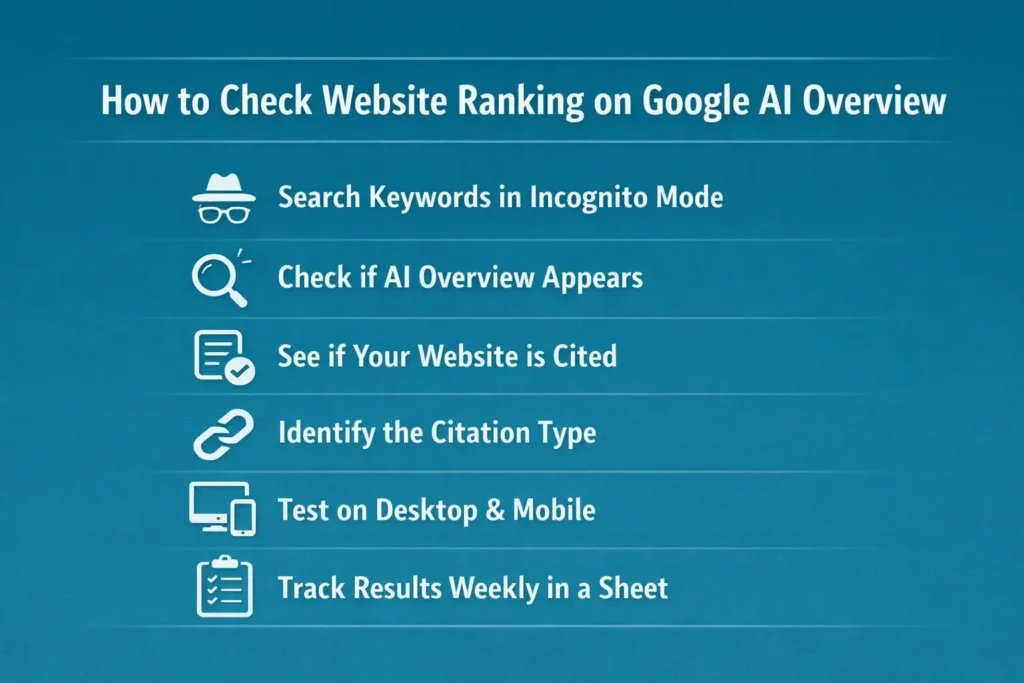
To check your website ranking in Google AI Overviews:
- Search target keywords in Incognito mode
- Confirm whether an AI Overview appears
- Check if your website is cited
- Identify the citation type
- Test on desktop and mobile
- Monitor patterns in Google Search Console
- Track everything weekly in a structured sheet
AI Overviews do not provide numbered rankings. Your “position” is determined by citation visibility and prominence.
In 2026, tracking AI citations is a core component of modern SEO measurement — and the first step before you optimize content for Google AI Overviews.